How to Build a Nextcloud-Backed Virtual Dataroom (VDR)
A comprehensive guide on turning self-hosted Nextcloud storage into a secure virtual dataroom with advanced sharing controls, viewer analytics, and follow-up automations.
Virtual data rooms (VDRs) are essential for secure external document distribution—especially during fundraising, due diligence, legal exchanges, and partnership negotiations. While storage systems like Nextcloud are excellent for internal collaboration, they often lack the granular security, page-level tracking, and workflow automation required for external sharing.
This guide outlines how to overlay Coneshare on top of your Nextcloud instance to build a secure, self-hosted virtual dataroom without modifying your core storage workflows.
What is a Virtual Data Room (VDR)?
A Virtual Data Room is a secure digital repository designed for distributing sensitive documents and rich media with external partners. Unlike standard storage sharing links, a VDR provides:
- Advanced Access Controls: Password protection, expiration dates, email verification, and copy/download restrictions.
- Precise Analytics: Visibility into who accessed the files, when, and page-level engagement (exactly how much time was spent on each page of a PDF or video segment).
- Dynamic Watermarking: Automatic overlays displaying the viewer's verified email address to deter leaks.
- Integrated Workflows: Actionable triggers that notify internal teams (e.g., via Slack or Webhooks) when external actions occur.
What is Nextcloud?
Nextcloud is a leading self-hosted content collaboration platform. It offers total data sovereignty and privacy, serving as a private, secure alternative to public cloud storage solutions like Google Drive or Dropbox. It is where teams organize files, manage internal permissions, and store organizational data.
Limitations of Using Nextcloud Alone as a VDR
Nextcloud excels at storage, but using its built-in sharing features for external deal rooms has limitations:
- Limited Behavioral Visibility: You can see if a link was clicked, but not which pages a buyer read, how long they spent, or if they forwarded it to others.
- Missing Follow-Up Workflows: Standard links do not trigger downstream actions in sales channels or notify owners of high-value revisits.
- Heavy Previews Strain Resources: Directly serving large files or rendering previews inside Nextcloud can strain low-spec server CPUs.
- Link Sharing Lacks Context: There is no easy way to bundle distinct files into custom presentation folders without creating new physical directories in storage.
How to Build a Nextcloud-Backed VDR
By connecting Nextcloud to Coneshare, you keep your files in Nextcloud while adding a VDR distribution layer. Here is the step-by-step process:
1. Store Files in Nextcloud
Organize and maintain documents in your existing Nextcloud workspace exactly as you do today.
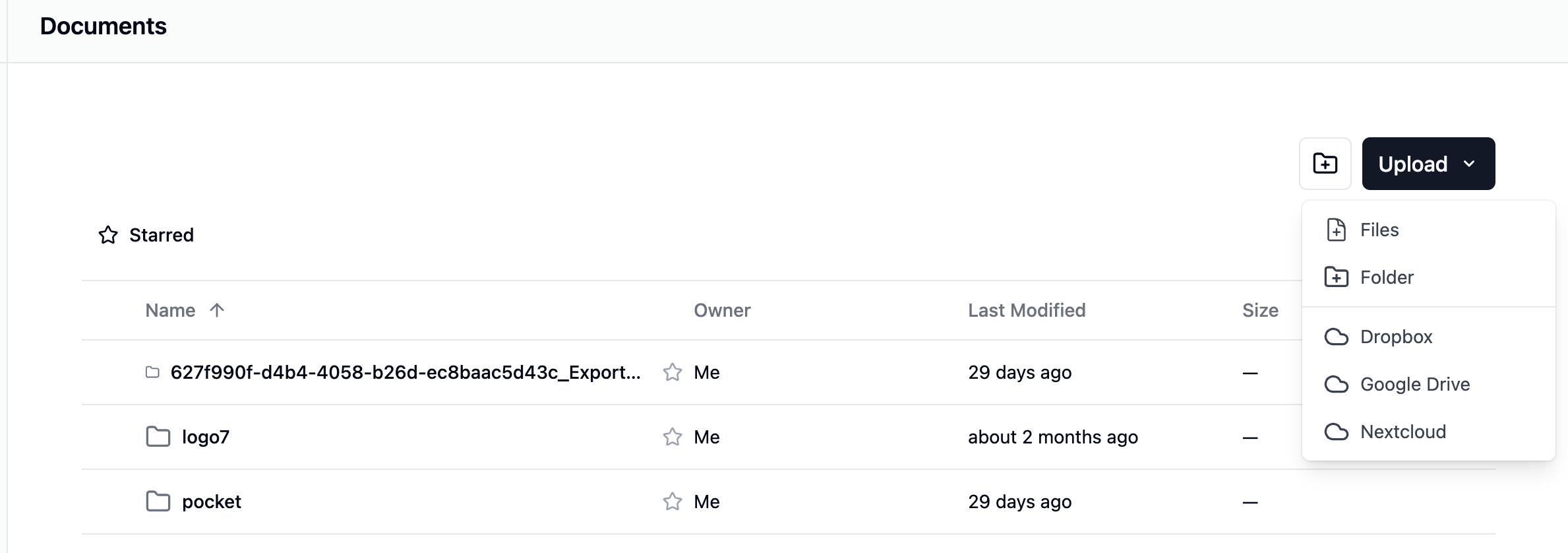
2. Connect Nextcloud to Coneshare
In Coneshare, navigate to your connections page and authorize your Nextcloud account. This allows Coneshare to index files securely and pull versions on-demand using API tokens.
3. Apply VDR Controls
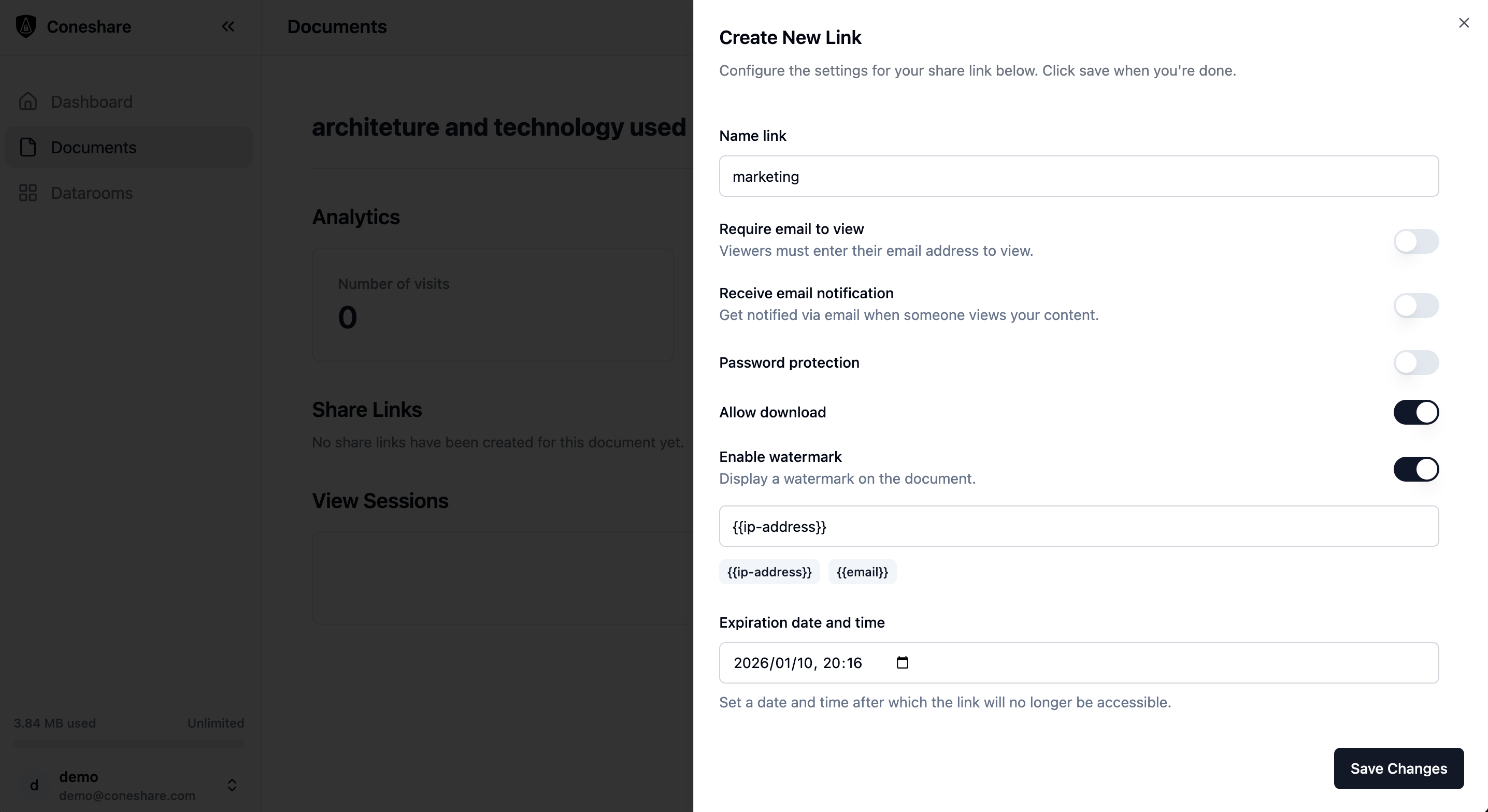
Create a Share Link or Dataroom inside Coneshare. You can apply granular rules:
- Restrict downloading for sensitive files.
- Enable dynamic watermarking to embed the viewer's email onto the document.
- Add password protection or enforce email verification.
4. Share Securely
Distribute the Coneshare URL to investors, buyers, legal counterparts, or clients.
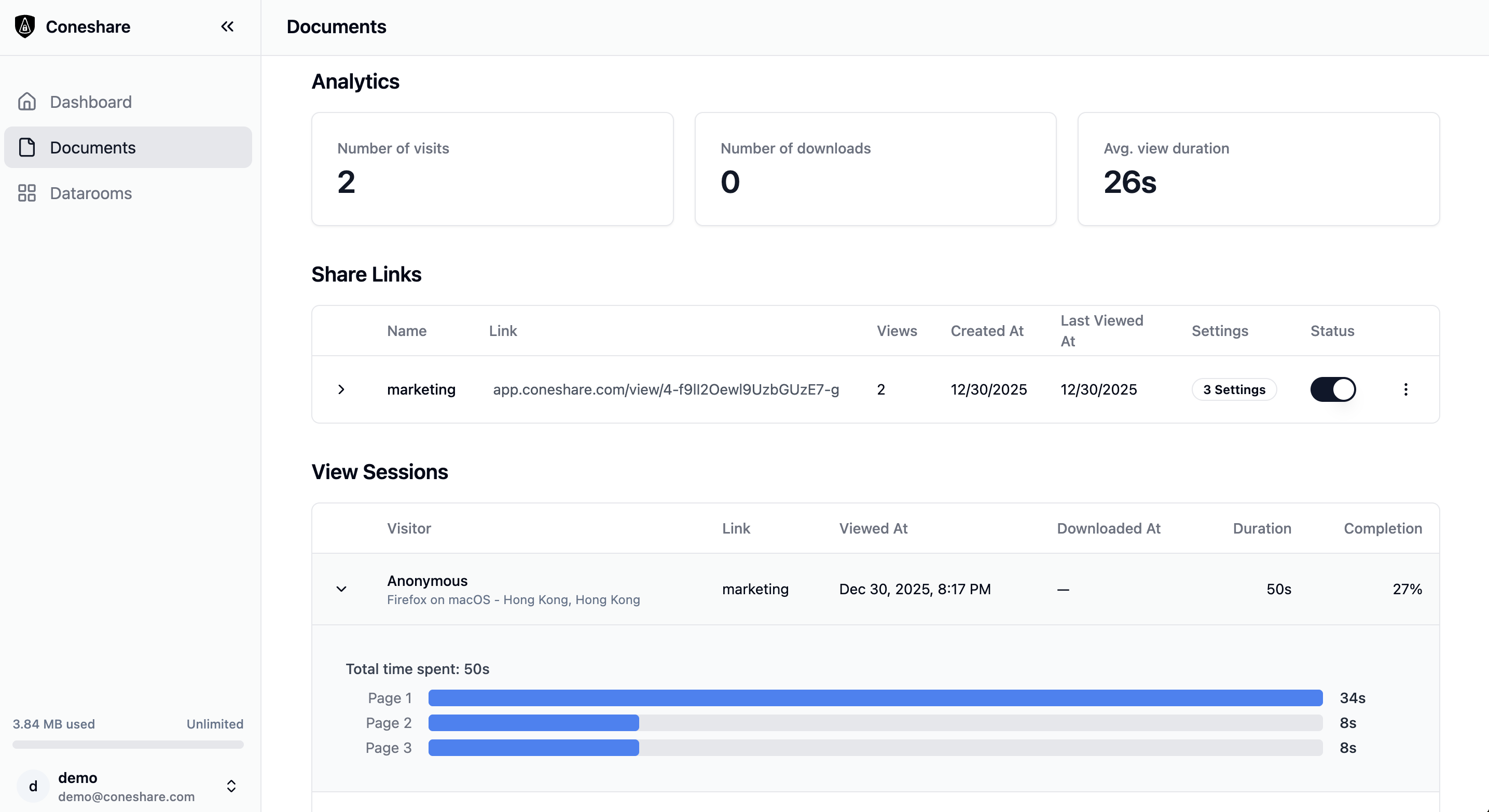
5. Track Engagement in Real Time
Monitor document engagement. See exactly when a file is opened, who opened it, and how much time they spent on specific slides or pages.
6. Act on Insights
Set up automation rules in Coneshare to ping a Slack channel or trigger a Webhook when a recipient opens a proposal or reaches a certain page.
Nextcloud Alone vs. Nextcloud + Coneshare
| Capability | Nextcloud Alone | Nextcloud + Coneshare |
|---|---|---|
| Storage & Collaboration | Yes | Yes |
| Secure External Distribution Controls | Limited | Yes |
| Granular Engagement Visibility | Limited | Yes |
| Workflow Automation | No | Yes |
Frequently Asked Questions
Does Nextcloud have a built-in VDR?
Nextcloud supports core folder structures and password protection, but it lacks the specialized tools required for deal rooms, such as page-level viewing analytics, dynamic watermark insertion, and external engagement follow-up automations.
How do I create a data room in Nextcloud?
The most reliable way is to keep your documents organized in Nextcloud, and connect that storage to a dedicated secure sharing layer like Coneshare to generate and manage the virtual dataroom interface.
Is Nextcloud secure for VDR use?
Nextcloud is highly secure for self-hosted data storage. However, for external sharing, adding a separate VDR layer like Coneshare helps enforce dynamic security permissions (like preventing downloads while allowing previews) and logging precise viewer interactions.