
Coneshare V1.11: Redesigned Dataroom Viewer, Banner Galleries, Whole-Room Downloads & Logging Upgrades
Coneshare V1.11 introduces a redesigned dataroom viewer with featured resource highlights, banner gallery modes, per-room branding logos, whole-dataroom streaming downloads, verified email tracking, and 12-factor container logging.
Redesigned dataroom viewer, whole-room downloads, and container-native logging
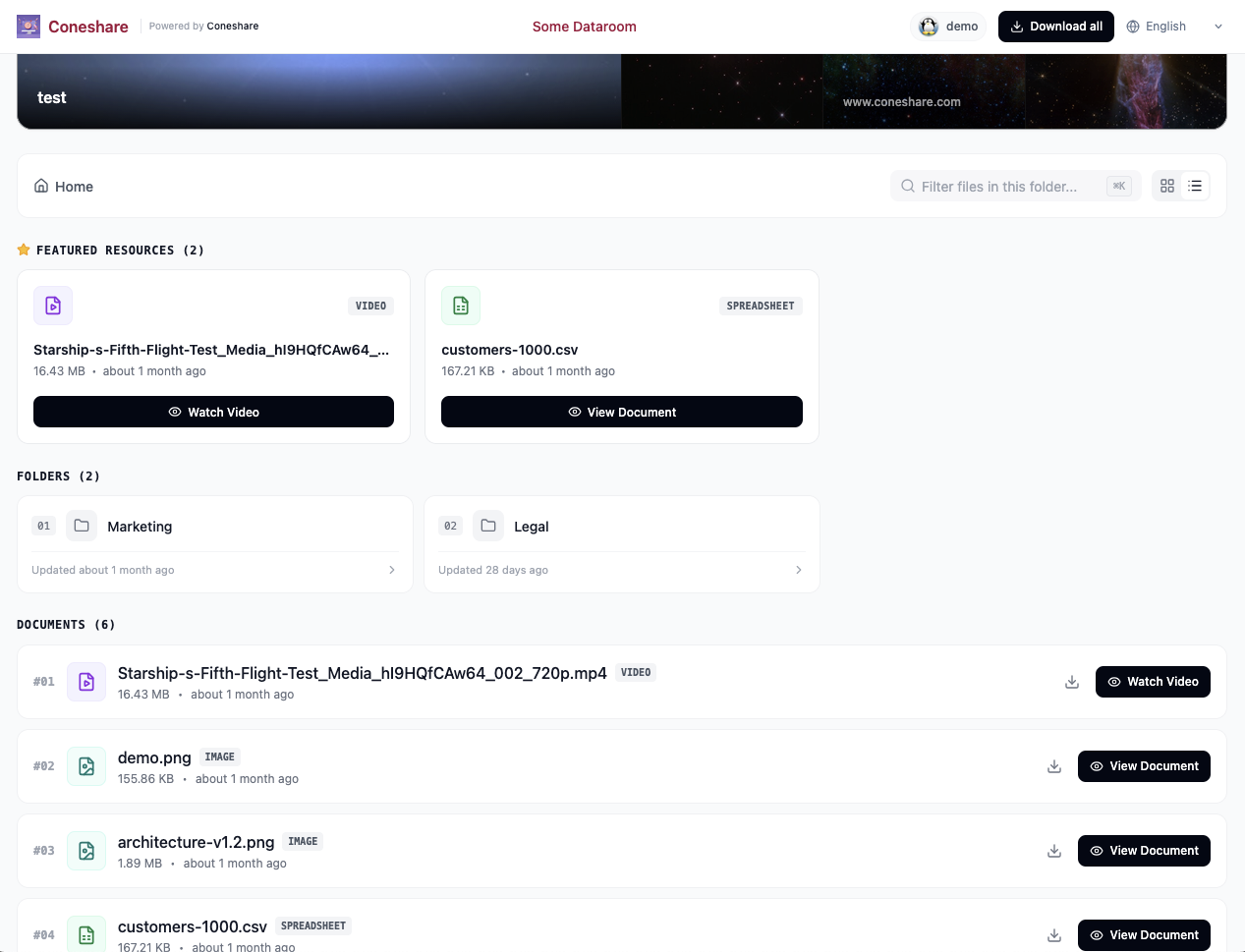
Coneshare V1.11 overhauls the external dataroom interface. Visitors now get a dedicated portal layout with customizable hero banners, a featured resources section for pinned deal documents, structured folder cards, and path breadcrumbs.
This release also adds multi-banner gallery mode, per-dataroom logo overrides, one-click streaming ZIP downloads for entire datarooms, verified email tracking in audit logs, 12-factor container logging, and several security fixes.
Major features in V1.11
1) Redesigned Dataroom Customer Viewer
The external dataroom viewing interface has been redesigned to look and feel like a modern client portal rather than a simple file index:
- Hero banner & intro: Add deal announcements, introduction letters, or company context directly above the file browser.
- Featured resources grid: Starred documents appear in a 3-column highlight grid above folders, so visitors can find critical files without digging through subdirectories.
- Folder cards: Folder rows show item counts, recent update timestamps, and contextual actions in compact cards.
- Breadcrumb navigation: A collapsible mobile sidebar and top breadcrumb path keep visitors oriented inside deep folder structures.
2) Banner Gallery Mode & Per-Dataroom Brand Logo Overrides
Deal rooms often need branding tailored to a specific client, partner, or transaction:
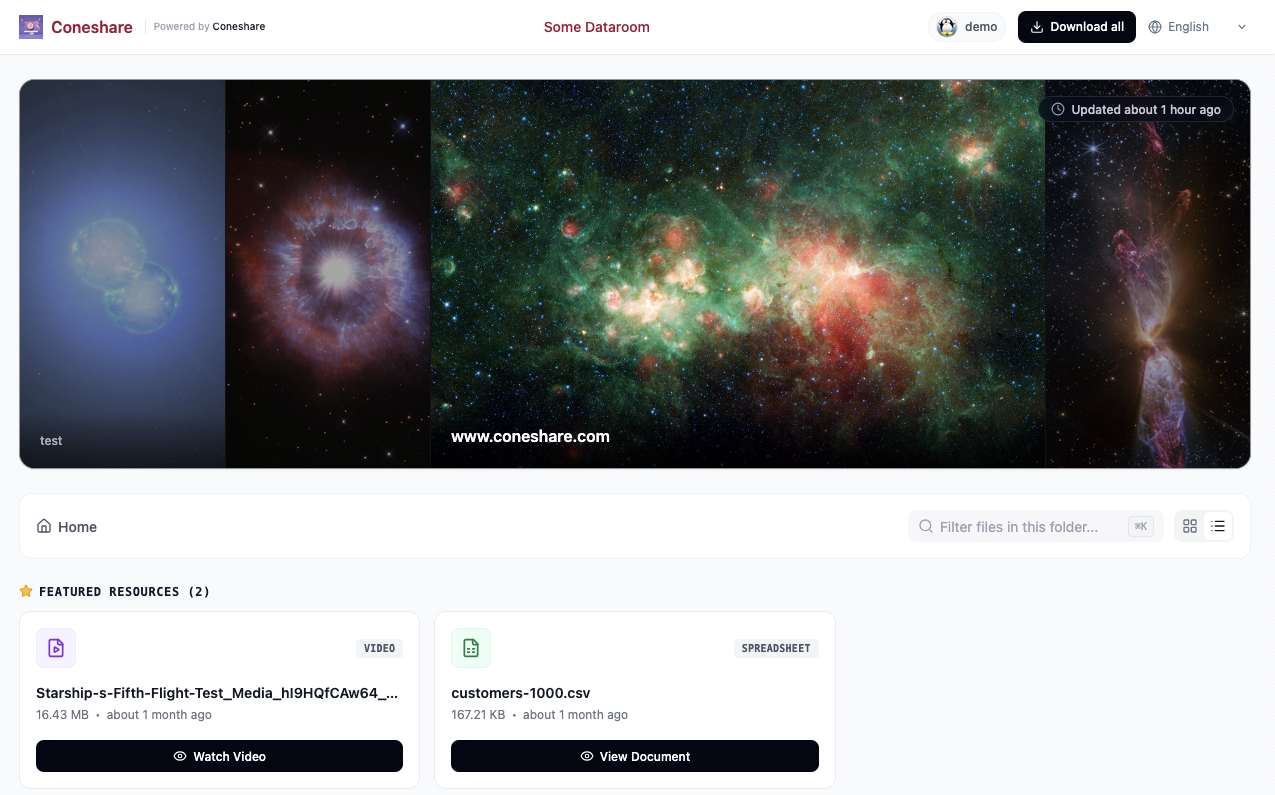
- Banner gallery mode: Datarooms now support multi-image banner carousels alongside single-banner and banner-disabled modes.
- Per-dataroom logo override: You can now upload a custom logo for individual datarooms in room settings. When sharing materials with external clients or acquisition targets, each room can display deal-specific branding while falling back to your organization logo if no custom logo is set.
3) Whole-Dataroom "Download All"
When downloads are enabled, visitors can now download an entire dataroom as a single archive directly from the viewer header:
- Low-memory streaming ZIP: The backend streams archive chunks directly to the response as files are bundled, avoiding memory spikes or large temporary files on the host.
- Permission aware: The archive generator respects every file and folder visibility rule and download permission configured on the share link.
- Audit trail: Archive downloads are recorded directly in the View Sessions activity log with accurate download timestamps.
4) Verified Email Tracking on View Sessions
Contributed by Industry (PR #422)
When viewers open email-protected links, deal managers need to know whether the email address was confirmed:
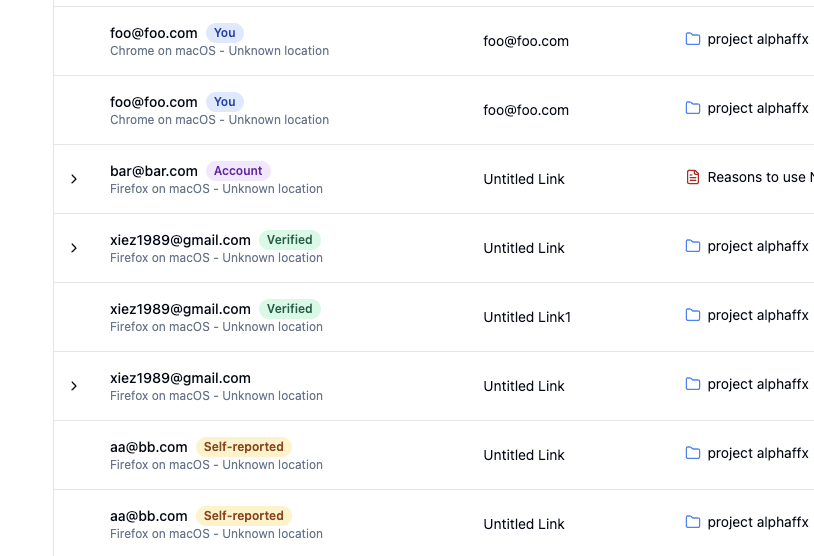
- Verification method logging: View sessions now track whether a visitor verified their address using a one-time passcode (
verified) or simply typed an unverified email into a form (self_reported). - Audit badges: The View Sessions table displays distinct
VerifiedandSelf-reportedbadges, making participant verification obvious at a glance.
Improvements & security updates
1) Sequential gate flow and spreadsheet copy protection
Share links that combine multiple security gates now run in a strict, predictable sequence: Email Verification → Password Gate → NDA Signature. Visitors complete each step without screen flickering or redundant prompt toasts.
In the spreadsheet viewer, sessions now record active viewing duration and enforce client-side copy restrictions, preventing unauthorized clipboard exports when copy protections are turned on.
2) Webhook security and Dutch (nl) locale
Outgoing webhook configurations are now restricted to organization administrators and include built-in SSRF validation to block URLs pointing to internal private networks (10.x.x.x, 192.168.x.x, 172.16-31.x.x) or loopback addresses (127.0.0.1, localhost).
This release also adds full Dutch language localization across the web application, email templates, and error messages, contributed by Robert-Jan Keizer.
3) 12-Factor container-native logging
Coneshare now follows the 12-factor event streaming model (Factor XI: Logs as Event Streams). Containers write unbuffered logs directly to stdout and stderr instead of writing to a shared ../logs host volume. This removes file-locking contention where web, worker, and video services wrote to and rotated the same log file simultaneously.
Log streams are separated by service role:
docker logs -f coneshare-webfor HTTP requests, API views, and Nginx proxy traffic.docker logs -f coneshare-celeryfor document preview generation and conversions.docker logs -f coneshare-videofor video transcoding tasks.
To aggregate logs in production, follow our logging setup guide to connect container streams to Loki, Datadog, Vector, or Dozzle.
4) Security patches & upgrade advisory
This release fixes several security issues involving storage boundaries, webhook validations, and preview access checks. Following coordinated disclosure practices, detailed vulnerability advisories will be published in about a week.
Thanks to Agatino Platania, Industry, and tal2k9dev-star for responsibly reporting these issues.
We strongly recommend all self-hosted and production operators upgrade to v1.11.0 as soon as possible.
Next steps
- Upgrade to V1.11.0: Follow the standard upgrade process to pull the latest Docker images.
- Configure log aggregation: Review the updated logging guide to stream container output to your monitoring stack.
- Full Changelog: Review the complete commit log for additional details.